Stop babysitting AI agents. Start shipping their work.
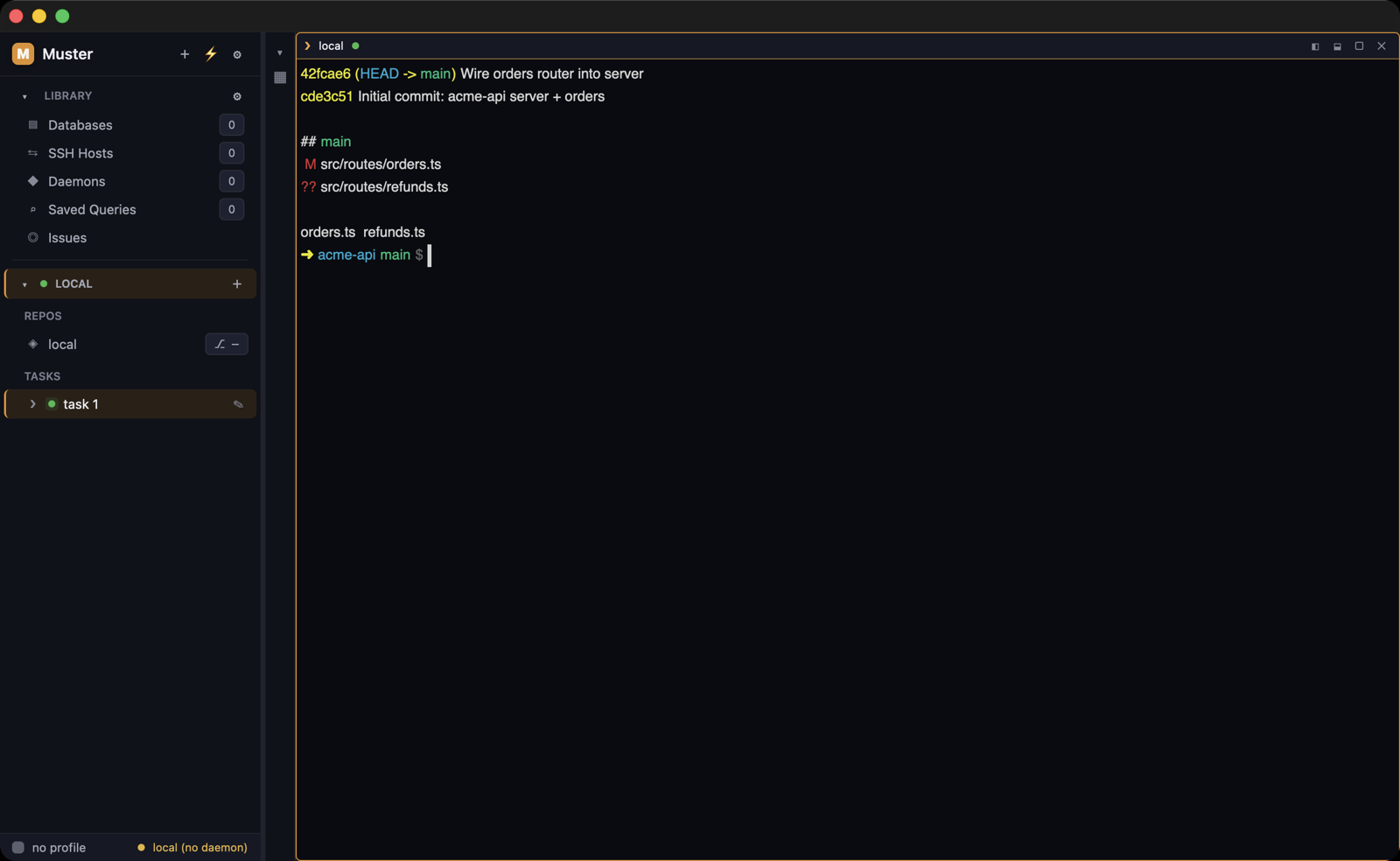
Muster is a native desktop cockpit that runs parallel coding agents on real work: each task in its own isolated git worktree, every diff reviewed hunk by hunk, every PR filed from the same window. Your databases, servers and tickets are already inside.
The agent era gave you a second job: babysitting.
The models write code faster than you can review it, and the tooling around them hasn’t caught up. So your day becomes herding terminals instead of shipping work.
Five agents, one main branch
Run two coding agents against the same checkout and they edit over each other, half-commit, and leave main in a state nobody wrote. Serialize them and you’ve thrown away the entire point of having agents.
The alt-tab relay
A terminal for the agent, a database GUI for the schema, an SSH client for the server, a tracker for the ticket, a diff tool for the review. The job’s context lives in five windows, and the copy-paste bridge between them is you.
Whose account was that?
One machine, two AI subscriptions, two GitHub identities. Log out, log back in, commit as the wrong person, and burn the company’s quota on a side project — or yours on its work.
One native cockpit for the whole loop.
Muster is an agent orchestrator for your own machine — a native desktop app for macOS, Linux and Windows that runs AI coding agents on real work. Give it a task and it can open an isolated git worktree, launch the agent CLI you choose with the permissions you grant, and hold everything the job touches — the terminals, the databases, the servers, the ticket — in one window.
A task can get its own worktree, then its agent
Turn on per-task worktrees and Muster opens an isolated git worktree and branch for each. Pick any of 23 agent CLIs — or a TOML adapter of your own — and watch live needs-input / running / review status. Or line up a queue and let it progress on its own.
Guardrailed access, then a real diff
The agent reaches your databases, tasks, hosts, diffs and issues through Muster’s MCP server with exactly the capabilities you granted — read-only until you say otherwise. You read what it actually changed, staging by hunk or by line.
From staged hunks to a filed PR
Keep what’s good, discard what isn’t, and hit Create PR. Muster pushes the branch and files the pull request. The linked issue moves with it, without a second app.
A fleet of agents, none of them on main
Each task can open its own isolated git worktree and branch — worktrees on, against an existing branch, or off (the default), per project, with post-create hooks when you need them. Agents work in parallel and never touch main or each other.
23 coding-agent CLIs ship as built-in adapters, driven from one control surface with live needs-input / running / review status. A generic shell adapter covers the rest, and your own adapter is a TOML file in a config-sibling adapters/ directory — picked up by the app, the muster CLI, the MCP server and the daemon alike. One bad adapter is named and isolated; it doesn’t take the others down.
- Session resume on the seven CLIs that support it — the CLI's own picker or its most recent session
- 16 of 23 adapters accept a model override at launch
- One-click CLI install, straight into the selected profile’s isolated environment
- Per-adapter screen-detection rules catch a logged-out CLI before it stalls a task
- Multi-repo projects and project groups: point a task at one repo in a workspace of many
Work and personal, fully separated on one machine
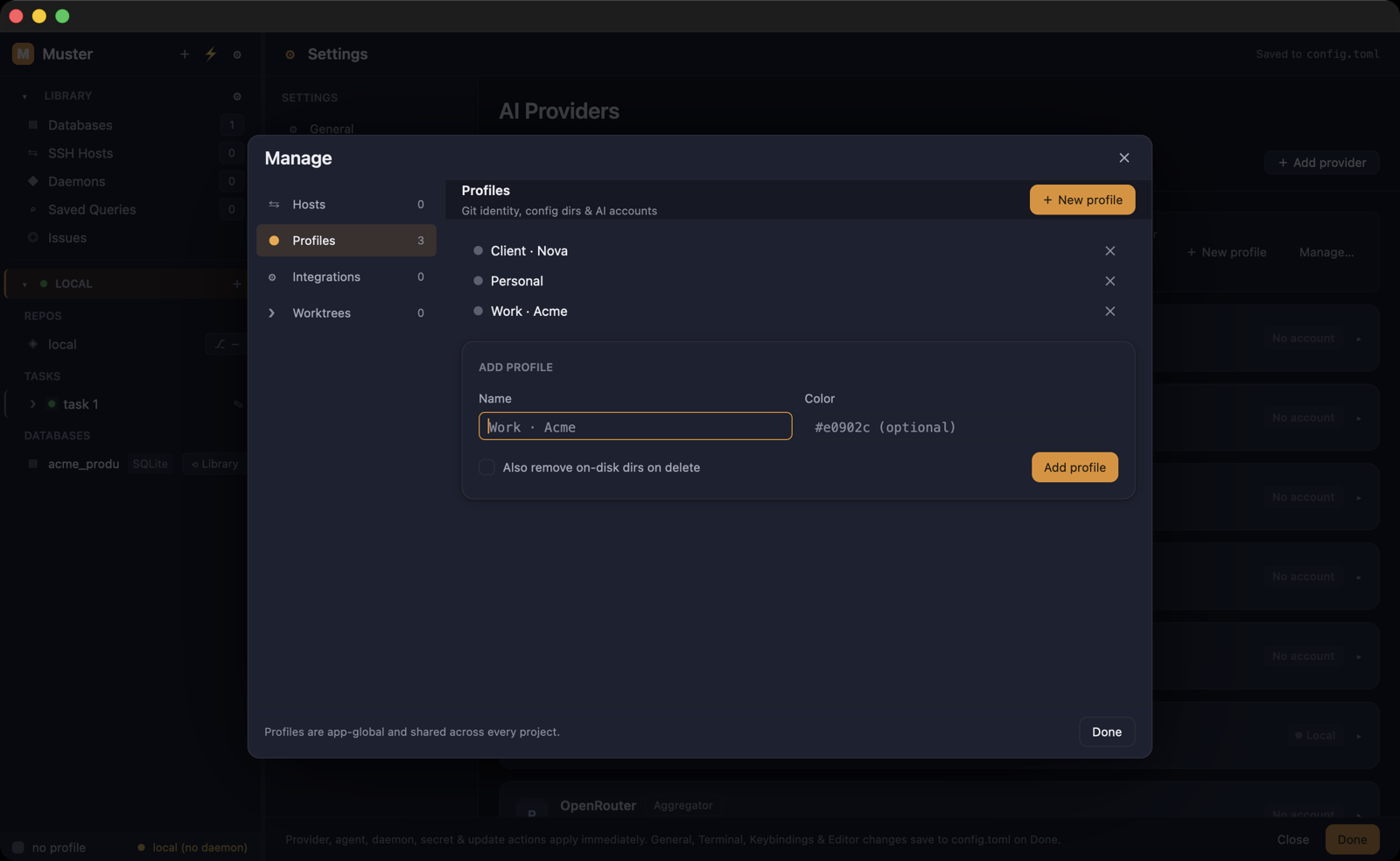
Profiles are not “accounts” in a sidebar. Each one is an isolated identity built by env redirection: its own HOME and config directories, its own SSH keys, git identity, GitHub login and AI-CLI logins. Assign a profile to a task and the right identity follows everywhere — the agent session, the commits, the push.
That is what makes running your employer’s AI subscription and your own at the same time boring instead of dangerous. No logging out and back in, no commits under the wrong name, no agent spending the wrong quota.
- Per-profile Node and Python versions, reusing the nvm/pyenv installs you already have
- Secrets in the OS keychain by default; encrypted-in-database or session-only stores for machines without one
- In-pane AI browser with a separate web session per profile — own data store per profile (macOS only)
- CLI installs and logins land inside the profile’s isolated environment, never your real HOME
Agents reach your data through a gate, not a promise
Muster’s MCP server exposes your databases, tasks, hosts, diffs and issues to the agent working the task. A new agent gets read capabilities — and never db_write. Write tools need both the capability and an explicit allow_write on the query, and the server enforces read-only SQL structurally rather than hoping the statement looks harmless.
Grants scope to a named database, host, project or worktree, and layer global → project → task. The layers intersect, and they re-resolve on every single request — so revoking a grant reaches the agent that is already running.
- Ask mode parks a call for in-app approval: 60 seconds, “allow once”, a 16-prompt queue
- Read and write are separate grants on every surface
- A narrower layer can only ever take access away
- The agent acts on your real context — schema, tickets, diffs — instead of guesses
The database GUI you can stop alt-tabbing to
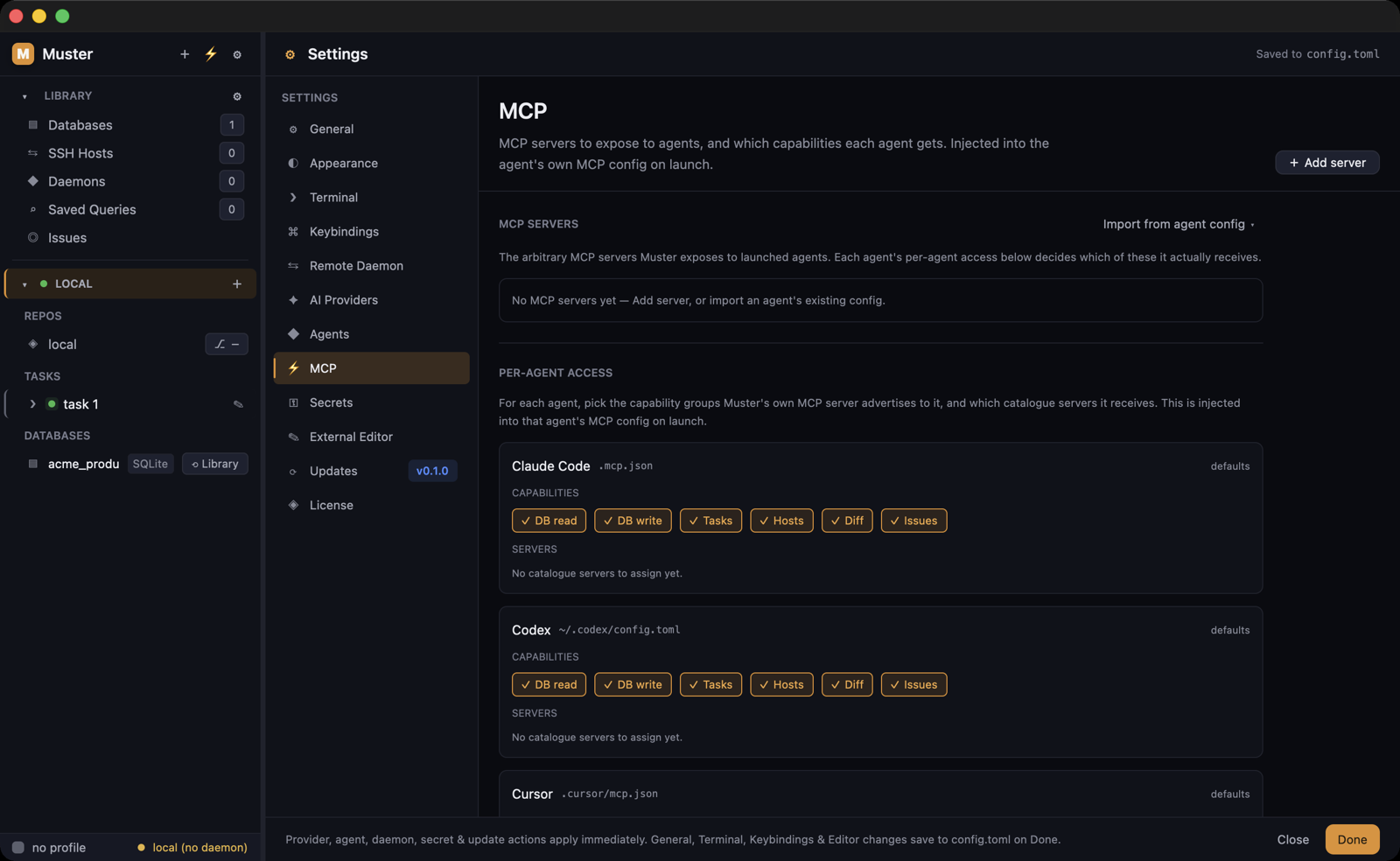
Postgres, MySQL, SQLite, MongoDB and Redis live inside the binary — nothing to install, nothing on PATH. You get a schema tree, an EXPLAIN plan visualizer, and an ERD built from your real foreign keys, in the same window as the code that depends on them.
The SQL editor has autocomplete, history, saved queries, cancel and per-query timeouts. Row editing is type-aware and keyed to real row ids. And because agents reach these same connections through MCP, the query the agent runs is the query you can read.
- In the results grid, any foreign-key cell jumps straight to the row it points at
- Native backup and restore per engine — transactional, re-runnable, refusing a truncated or wrong file
- The full Postgres TLS sslmode ladder, including client-certificate (mTLS) auth
- Agents inherit your saved connections read-only until you grant DB write
Nothing merges that you haven’t read
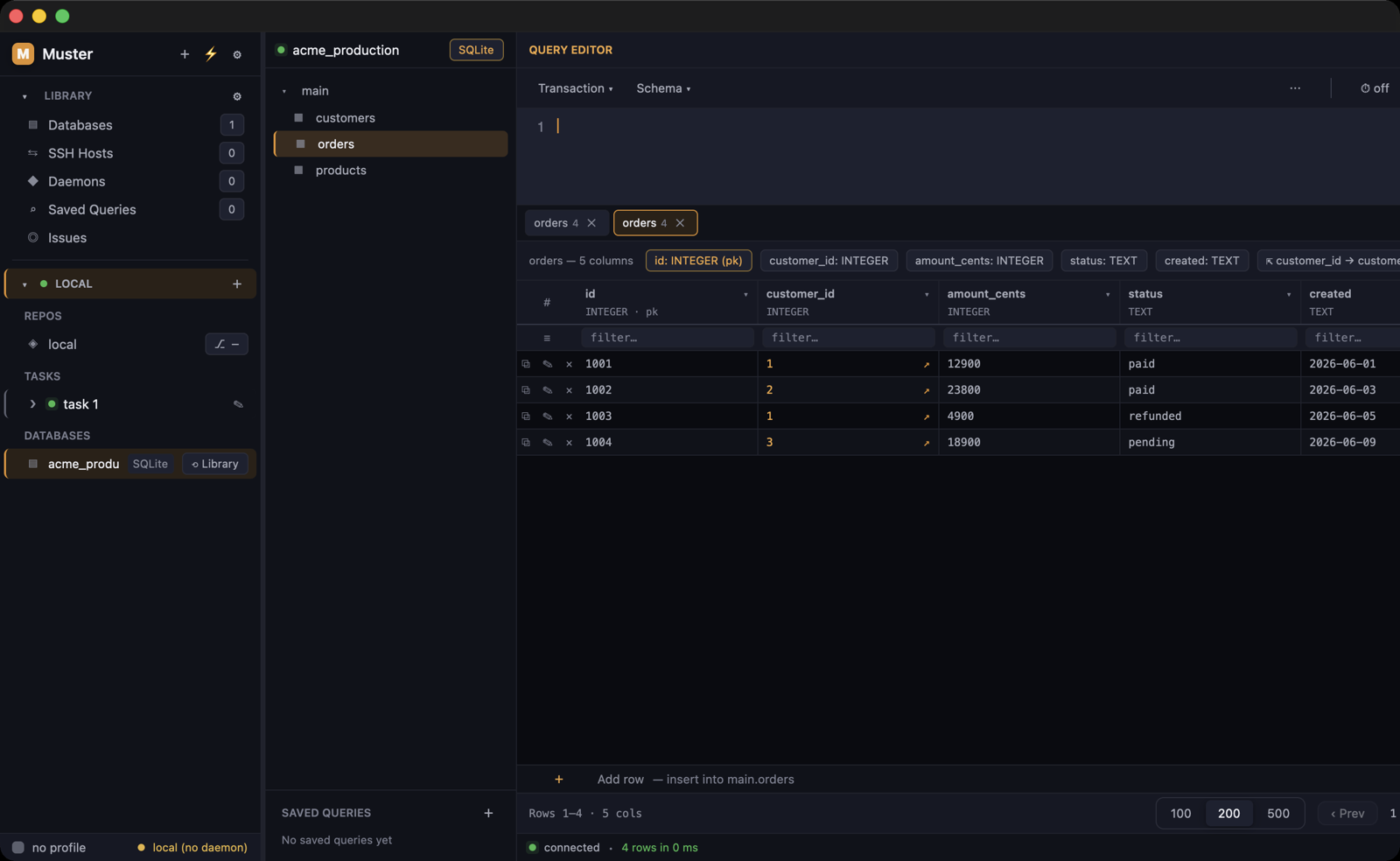
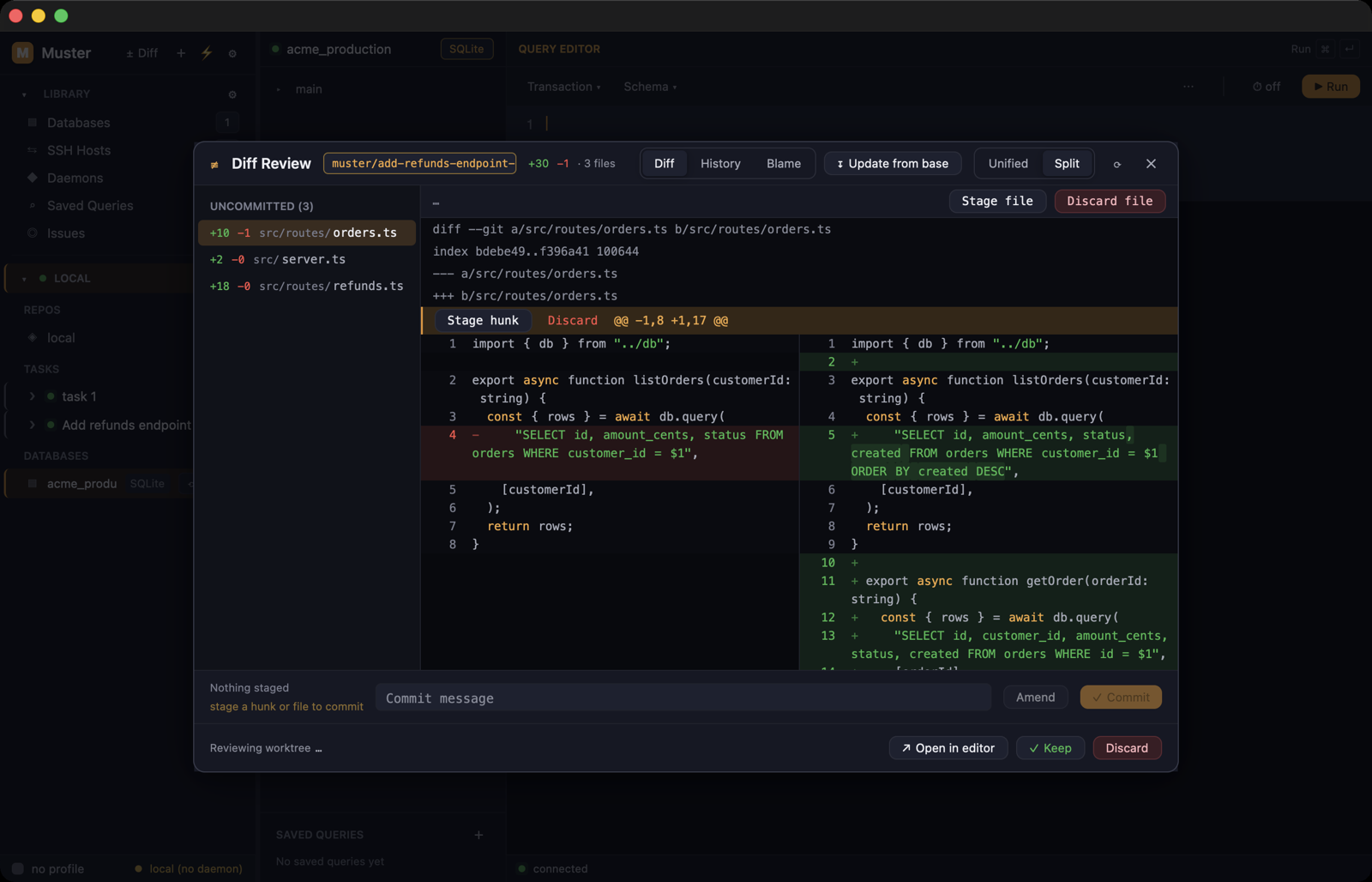
The review is a real diff reviewer, not a status badge. Unified or split view, stage, unstage or discard by hunk or by line, and inline review notes kept locally or pushed as PR comments.
When it’s right, Create PR pushes the branch and files the pull request. When the base moved, update-from-base with a conflict resolver brings the task current without leaving the app.
- Ignore-whitespace toggle, blame, and full file history
- Update-from-base with an in-app conflict resolver
- Force-push only with --force-with-lease — never a blind overwrite
- Any file hands off to VS Code, Cursor, Zed, Sublime or Neovim at the exact line
The boring half of the ticket runs itself
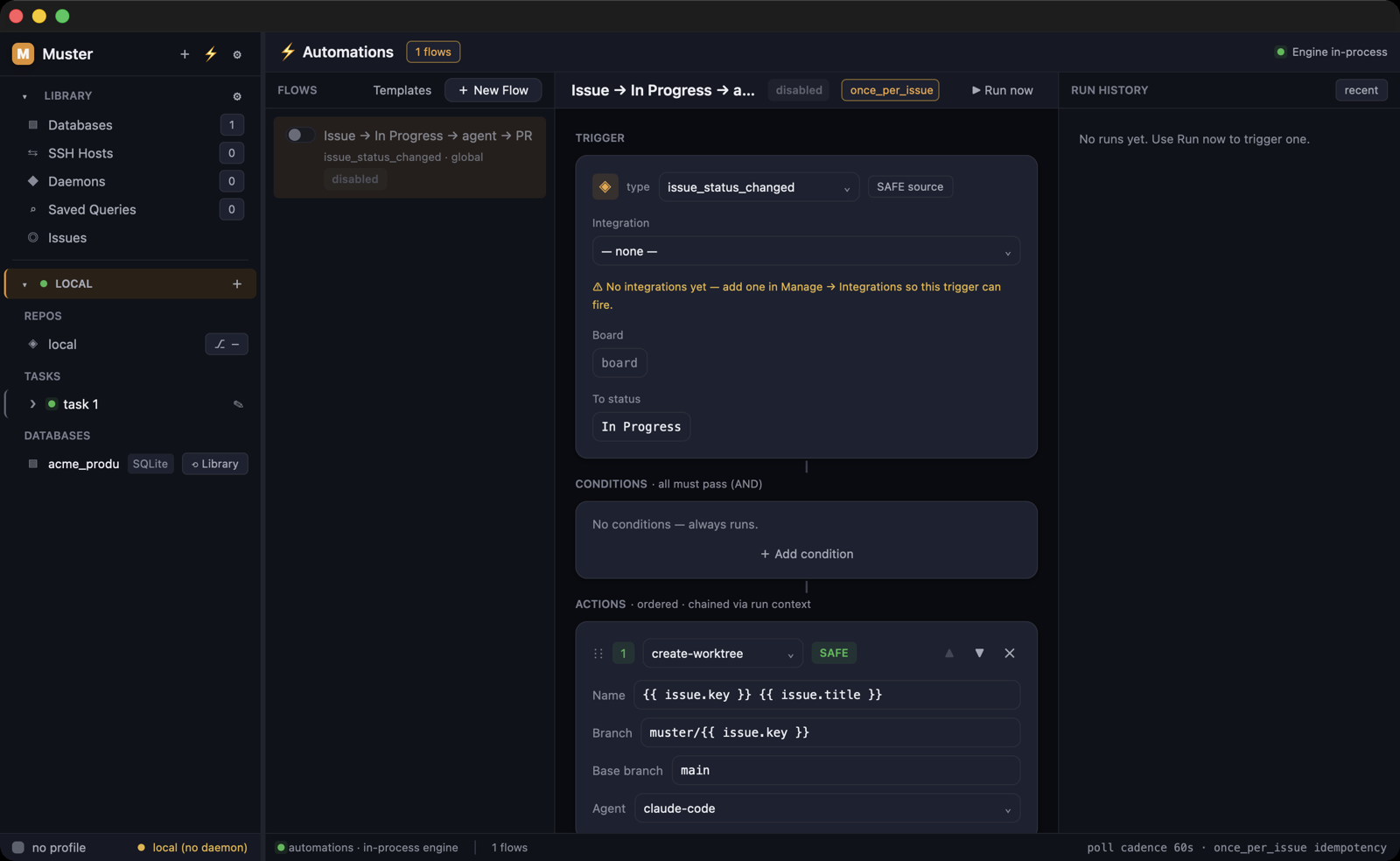
Flows are trigger → condition → action: ten triggers — issue created, assigned or status-changed, task status, schedule, git push, PR merged, CI status, webhook and manual — and nine actions with retry backoff. PR and CI triggers work on GitHub and GitLab alike. Conditions match on labels, priority, status or any payload field.
They run with safety rails, not hope: a priming gate, an idempotency ledger, a loop guard, a kill switch, a single-owner poll lease, per-flow rate limits, a master switch and webhook tokens you can regenerate. Flows run in-process while the app is open — or headless in the local daemon when keep-running is on, alongside your agent sessions and PTYs, which survive quitting the app.
- Turn an issue into worktree → agent run → opened PR, unattended
- Reattach to live sessions with their scrollback after reopening
- Desktop notifications with sound on macOS, Linux and Windows when an agent blocks, finishes or fails
- `muster queue run` spawns into the daemon, so queued agents outlive the command
Your repos live on a server. So can the work.
A project carries a host, and then its agents and terminals run on that machine — the task works in the repo root there, and the whole git flow goes with it: worktrees, diff review, the repo panel and PRs all run on the remote host. Muster’s remote daemon bootstraps itself idempotently, version-checked and verified by checksum and signature. Secrets are forwarded per spawn and never persisted on the remote. And a dropped connection doesn’t kill a running agent. One caveat, in the open: scoped MCP permissions with Ask approvals don’t reach remote agents yet.
- Two ways in, both verifiedA loopback socket over an SSH tunnel, or direct TLS with MUSTER-PAIR pinned-certificate pairing.
- Host keys stay strictAn unknown key is refused everywhere except one interactive fingerprint prompt. A changed key is refused outright.
- A full SSH client in the same windowInteractive terminal, dual-pane SFTP/rsync with drag-drop, resume over rsync (3.1+ on both ends) and four-way conflict handling, and atomic staged uploads — no half-written file on the server.
- Tunnels and oversightLocal, remote and dynamic port forwards with dead-session detection, plus a host monitor: the top-20 CPU processes and disk usage, live.
- Key auth everywhere, passwords where they belongKey authentication works on macOS, Linux and Windows. Password authentication is macOS and Linux only — refused up-front on Windows.
…and everything else in the same window.
Terminal, database GUI, SSH client, git review, issue tracker: one native app holds all of it. Your agents work from the same context you do. No more copy-pasting a schema into a chat box and hoping.
Let AI agents work without touching prod — or each other
Run several agents on real work at once. Each task can get its own isolated git worktree and branch, so nobody stomps main or overwrites another agent’s changes. When one finishes, review the diff hunk by hunk and hit Create PR. Muster pushes the branch and files the pull request for you.
- Isolated worktree and branch per task when you want it — a per-project choice, off by default
- Spawn, monitor, resume, and queue coding agents per task
- Multi-repo projects: point a task at one repo in a workspace of many
- Split panes and saved layouts so multiple sessions stay in view
- Closed-task history you can reopen any time
Give agents your real context — with guardrails you control
One control surface for 23 coding-agent CLIs, with needs-input / running / review status on each — from the CLI’s own status hook where it offers one, per-adapter screen detection otherwise. A generic shell adapter covers anything not built in. Adapters are plain config, so a new CLI is a file, not a release. Each agent edits code in its own worktree. It reaches your databases, tasks, hosts, diffs and issues through Muster’s MCP server, and only with the capabilities you grant.
- 23 agent CLIs on one control surface, plus a generic shell adapter for the rest
- One-click CLI install, straight into that profile’s isolated environment
- Needs-input / running / review status on every surface — hook-authoritative where the CLI wires one, screen-read otherwise
- Read-only by default: per-agent caps on DB read vs write, tasks, hosts, diff and issues
- Per-adapter detection rules catch a logged-out CLI before it stalls a task
Bring your own models — and your own accounts
Sign a CLI in without leaving the app. The login runs in that profile’s own isolated environment and the credential stays there. Point an agent at Anthropic, OpenAI, Google, Cursor, OpenRouter, DeepSeek, xAI, Mistral, Moonshot, Z.ai or Sourcegraph. Or at a local Ollama, or any endpoint you name. Muster sells you the cockpit, never the tokens.
- 13 provider descriptors, including local Ollama and a fully custom endpoint
- In-app CLI login: no terminal trip to authenticate an agent
- Each profile holds its own accounts, and an agent sees only the one you assigned
- Bring the AI subscriptions you already pay for, with no per-seat AI bill from us
- Override base URL, token and model per agent and per profile — the model where the CLI accepts one at launch (16 of 23)
Never alt-tab to a database GUI again
Postgres, MySQL, SQLite, MongoDB and Redis live in one native studio. Read a query plan as a tree instead of a wall of text. See your schema as an ERD. Your agents reach the same saved connections through Muster’s MCP bridge, read-only until you enable DB write.
- EXPLAIN plans as a node tree, and an ERD built from your real foreign keys
- SQL editor with autocomplete, history, saved queries, cancel, and per-query timeouts
- Type-aware row editing bounded to a single row — keyed on the primary key, or the physical row id when there isn’t one
- Native backup and restore per engine. No pg_dump, no mongorestore, nothing to install
- Restores refuse a truncated or wrong file instead of destroying the database
- Postgres TLS that actually verifies the certificate, including client-cert auth
Your servers, in the same window as your agents
Terminals, SFTP, tunnels, snippets and a remote editor for every server you manage. An encrypted remote daemon keeps your sessions alive after you close the window. Muster refuses an unknown host key instead of quietly adopting it. Anything that runs without you watching fails on a server you have never verified.
- Strict by default: scripts, transfers and tunnels refuse an unverified host
- Only one surface ever adopts a key, and only after you see the fingerprint and accept
- Dual-pane file manager with drag-drop, resume over rsync (3.1+ on both ends), and four-way conflict handling
- Uploads stage to a temp path, then swap atomically. No half-written file on the server
- Local, remote, and dynamic port forwards, with dead-session detection built in
- A live host monitor for CPU, processes and disks, without leaving the app
Work and personal AI subscriptions — one machine, never mixed
Keep your company’s AI subscription and your own side by side. Profiles are fully isolated identities, not just “accounts”: each gets its own HOME, config, SSH keys, Git identity and GitHub login. Every task picks up the right one automatically. No logging out and back in, no commits under the wrong name, no agent spending your personal quota on company work.
- Two subscriptions of the same AI tool, running at once, fully separated
- Commits always carry the right identity for the repo you’re in
- Separate SSH keys and GitHub logins: work stays work, personal stays personal
- An agent sees only the accounts of the profile you gave its task
- Per-profile Node and Python versions, reusing your nvm/pyenv installs
- An in-pane AI browser with per-profile web logins, exactly like the CLI ones (macOS)
Turn an issue into a shipped PR
Connect your tracker, pull real work into a task, then push progress back. The board stays current without a second app.
- Linear, Jira, Trello, GitHub, GitLab, Asana, and Azure DevOps
- One-click import: the issue body becomes the agent’s context
- Status pushes back as the task moves, and comments post to the ticket
- Create issues in-app with provider-native types
- Linked markers stop you importing the same issue twice
- Self-hosted GitLab and Jira welcome, with HTTPS enforced so your token never travels in the clear
The boring half of every ticket, done before you look
Routine shipping steps run themselves: create a worktree, run an agent, open a PR, notify. Flows are trigger → condition → action. They run in-process while the app is open, or headless in the local daemon when keep-running is on.
- Ten triggers: issue created / assigned / status, task status, schedule, git push, PR merged, CI status, webhook, manual
- PR and CI triggers work on GitHub and GitLab alike
- Conditions on labels, priority, status, and any payload field
- Actions with retries: worktree, agent, PR, set status, notify, HTTP, shell
- Approve gates for risky steps, plus full run history and re-runs
- One master switch, per-flow rate limits, and webhook tokens you can regenerate
A real editor for the moments you don’t want a whole IDE
An agent leaves a line wrong, a config needs one value changed, a remote file needs a look. Open it right here, on a local repo file or a file on a server over SFTP. You get syntax highlighting, find and replace, real selection and clipboard. When the change deserves your actual IDE, hand it off at the exact line.
- Syntax-highlighted editing for local repo files and remote files over SFTP
- Find and replace with literal, case-sensitive, whole-word and regex modes
- Remote saves catch a file that changed on the server while you were editing
- Line endings survive the round trip: a CRLF file edits as LF and saves as CRLF
- Open in VS Code, Cursor, Zed, Sublime or Neovim, at the right file and line
Nothing ships that you haven’t read
A real diff reviewer, not a status badge. Read exactly what an agent changed, stage by hunk or line, and shape a clean commit before it goes out.
- Stage, unstage or discard by hunk or line range, in unified or split view
- Inline review notes, saved locally or pushed as PR comments
- Ignore-whitespace toggle, expandable context, and large-diff gates
- Update-from-base with a conflict resolver, blame, and full history
- Force-push only with --force-with-lease, never a blind overwrite
Run agents like a pipeline, not a chore
Line work up and let it run. Queue tasks with a starting prompt, an agent and a profile. Muster opens each worktree, feeds the prompt, and moves the task to review when it’s done.
- Ad-hoc or template-based queue entries, each with its own prompt
- Per-entry agent and profile, so one queue can mix stacks
- Automatic worktree → agent → review progression
- Retry a failed run in place, with nothing to retype
- Templates turn your best workflows into one click
Close the lid. The work keeps going.
Long agent runs shouldn’t be hostage to an open window. Switch on keep-running and a local headless daemon holds your agent sessions, PTYs and automation flows after you quit. Open the app again and they come straight back, still running. Desktop notifications tell you when an agent needs you, finishes or fails, so you can walk away and still hear first.
- Agent sessions and automation flows survive quitting the app. One setting, off by default
- Reopen and reattach to live sessions: nothing restarted, no context lost
- Notifications on macOS, Linux and Windows when an agent blocks, finishes or fails
- Pick which states notify you, with or without sound
- `muster queue run` spawns into the daemon, so agents outlive the command that started them
An agent touches exactly what you name. Nothing else.
Name the databases, hosts, projects and worktrees an agent may touch. Grants layer global → project → task and resolve on every single request. Tighten one and it reaches the agent already running.
- Scope a grant to one database, one SSH host, one project, one worktree
- Read and write are separate grants: read-only unless you say otherwise
- Presets for the common shapes, then edit any layer by hand
- Ask mode parks the agent until you approve that one call in the app
- Every layer intersects, so a narrower layer can only ever take away
Built for people who don’t reach for the mouse
Every surface is one shortcut away. Come back tomorrow and everything sits exactly where you left it. Spread work across as many windows as you have monitors. Then make it look like something you chose: dark or light, four accents, your own UI font.
- Command palette with fuzzy ranking, recents, and pinned actions
- Global search across tasks, files, hosts and databases, regex included
- Open as many windows as you like, one task per monitor
- Obsidian dark or a proper WCAG-AA light theme, four accent colours, your UI font
- Customizable keybindings for every global action, and a searchable config reference in-app
- Full session restore: panes, layouts, drafts and selections
- A `muster` CLI drives the running app: list, spawn, wait, attach, stream events, work the queue, apply permission policies
Your code, data, and credentials never touch our servers
Muster is desktop software. It connects straight to your databases, hosts and trackers, and secrets live in your OS keychain. Licensing and update checks are the only cloud traffic. Your agents work on real systems without routing anything through someone else’s cloud.
- Direct connections to your DB servers, SSH hosts, and trackers
- Credentials in the OS keychain, SSH private keys on disk referenced by path — never uploaded
- No system keyring? Choose an encrypted-in-database or session-only store instead
- A pane can’t hijack your clipboard. Agent output writes to it only once you allow it
- We handle licensing and updates, never your code or data
- Your license verifies on your own machine, so day-to-day use works offline
- Updates are signed and verified, and roll back if the new build fails its health check
From a task to a merged PR.
Four steps take an agent’s work from prompt to reviewed PR. You stay in one window for all of them.
Connect your world
Add repositories, databases and SSH hosts once. Credentials go into the OS keychain, never our servers. Reuse them across projects from the Library.
Create a task
Describe the work. Give it its own isolated git worktree and branch — a per-project choice, off by default — so it runs alongside everything else in flight.
An agent gets to work
Send your coding-agent CLI of choice into the task. It edits code in its own worktree. It reaches your databases, tasks, hosts, diffs and issues through MCP, with only the capabilities you allowed. Read-only unless you say otherwise.
Review the diff & open a PR
Watch live status, stage by hunk or line, then hit Create PR. Muster pushes the branch, files the pull request, and moves the linked issue for you.
Desktop software, with a paper trail you can check.
Muster runs on your machine and talks to your infrastructure. The licensing and update story is engineered to be boring: verified locally, signed end to end, and unable to lock you out over a network blip.
Licensed on your machine
Your key is an ed25519 signature your own device verifies, so day-to-day work needs no network. The daily online check fails open: a call that can’t get through only shortens the retry — it never locks you out. Only an explicit revoke clears a license.
Signed self-updates
Every update is ed25519-signed and the raw manifest is verified before anything installs. A new build that fails its health check rolls itself back.
Nothing proxied
Muster never proxies or stores your code, prompts or agent output. Its entire contact with our servers is activation, the daily license check, update checks, and the signed daemon it downloads to a remote host you connect.
Secrets stay in the vault
Credentials live in the OS keychain by default, with encrypted-in-database or session-only alternatives. Every log line passes through a redaction pipeline.
Three people who feel it on day one.
Two AI subscriptions, zero collisions
Client work runs on the company’s AI login; your side project on your own. Each profile keeps its own HOME, SSH keys, git identity and GitHub login, so a commit never lands under the wrong name and an agent never spends the wrong quota.
A fleet you check, not chase
Line up the evening’s tickets in the queue — up to eight running at once, each with its own prompt, agent and profile — and let worktree → agent → review run itself. Keep-running holds the sessions after you close the lid, and a notification names the one that needs you.
The box under your desk is optional
Your repos already live on a build server. Point the project at that host and its agents and terminals run there — worktrees, diff review and PRs too, all on the remote machine. Secrets cross per spawn and never stay, and a flaky connection doesn’t kill a running agent.
What runs where.
macOS on Apple Silicon, Linux on x86_64, Windows on x86_64. One license activates one device on any of them. A few surfaces are still platform-bound, and you should see that here rather than after paying.
| Feature | macOS | Linux | Windows |
|---|---|---|---|
| Agents, worktrees, diff review, PRs | Yes | Yes | Yes |
| Database studio — all five engines | Yes | Yes | Yes |
| Automations, MCP server, permissions | Yes | Yes | Yes |
| Desktop notifications + sound | Yes | Yes | Yes |
| SSH terminal, SFTP, tunnels (key auth) | Yes | Yes | Yes |
| SSH password authentication | Yes | Yes | — |
| One-click agent-CLI install | Yes | Yes | Most |
| In-pane AI browser | Yes | — | — |
“Most” means a handful of agent CLIs ship shell-script installers that need a POSIX shell. On Windows those open their official install page instead. Full detail in the documentation.
Buy once. It’s yours.
One payment, $39 per device — every feature, and every future version included.
Muster
- The whole cockpit in one tier: worktrees, agents, databases, SSH, trackers, automations. Nothing held back for a higher plan.
- A perpetual license, verified on your own machine. Works offline day to day — if the daily check can't reach us, you keep working. Only an explicit revoke clears a key.
- Buy once, update forever. Every future version is included. Each update is signed and verified, and installs when you say so.
- Your code, prompts and agent output never reach us. The only traffic is activation, a daily validity check, and update checks.
- 23 coding-agent CLIs, five database engines, and a full SSH client — all built in, all included.
Buying for several machines? Volume pricing applies itself: 5+ devices take 20% off each, 10+ take 30% off — set the count and the total above shows it.
Muster is independent software — no investors, no growth targets, no AI markup. The license is the whole business model.
Questions, answered.
What is Muster, in one line?
One native cockpit for running AI coding agents on real work — each task can run in its own isolated git worktree. Review their changes and ship them from the same app, with your databases, SSH and issue trackers already in it.
Can I use work and personal accounts at the same time?
Yes. That is exactly what profiles are for. Each one is a fully isolated identity: its own AI subscription login, SSH keys, Git identity and GitHub account. Assign a profile to a task or project and the right identity follows everywhere — agent sessions, commits and pushes. No logging in and out all day, no commits under the wrong name, no agent burning your personal quota on company work.
Which databases are supported?
Postgres, MySQL, SQLite, MongoDB and Redis. Each connection gives you a schema tree, ERD, SQL editor with cancel/timeout/history/saved queries, a sortable and filterable results grid, type-aware row editing, DDL, transactions, EXPLAIN plans, and CSV/JSON import/export. Your agents reach those same connections through MCP.
Which AI agents and CLIs work with it?
23 coding-agent CLIs ship as built-in adapters, covering the widely used ones. A generic shell adapter handles anything else. All of them run from one control surface with live status — from the CLI’s own status hook where it supports one, per-adapter screen detection otherwise. The full list is in the app under Settings → Agents, and in the docs. Adapters are plain config files, so you can add a CLI that isn’t built in yet without waiting on a release.
Do I have to pay for AI on top of the license?
Not to us. Muster drives the agent CLIs and AI subscriptions you already pay for. There is no AI markup, no per-seat token bill and no Muster API key. Sign a CLI in from inside the app and the credential stays in that profile’s isolated environment. Thirteen provider descriptors ship built in: Anthropic, OpenAI, Google, Cursor, Sourcegraph, OpenRouter, DeepSeek, xAI, Mistral, Moonshot and Z.ai, plus a local Ollama and a fully custom endpoint. Point an agent at a model running on your own machine and you spend nothing per token at all.
What happens to a running agent if I quit the app?
By default the sessions close with the app. Turn on keep-running and a local headless daemon holds your agent sessions, PTYs and automation flows after you quit. Reopen the app and they come back, still running. Desktop notifications on macOS, Linux and Windows tell you when an agent needs input, finishes or fails, so you can walk away from a long run without babysitting a window. `muster queue run` also spawns into that daemon, so queued agents outlive the command that started them.
I live in VS Code / Cursor. Do I have to give that up?
No. Muster is the cockpit around your editor, not a replacement for it. Any file is one click from opening in VS Code, Cursor, Zed, Sublime or Neovim at the exact line, straight from the diff view or global search. A real editor is built in for the small stuff: one wrong line from an agent, one config value to change, a file on a server you want to see. It gives you syntax highlighting, regex find-and-replace and proper selection, on local repo files and remote files over SFTP.
What is MCP, and why does it matter?
Model Context Protocol is the open standard agents use to reach tools and data. Muster runs an MCP server that exposes your databases, tasks, hosts, diffs and issues. The agent acts on your real context instead of guessing, and you stop copy-pasting schemas and results back and forth.
Is it safe to let an agent touch my database?
Through Muster’s MCP bridge, yes by default. A new agent gets DB read, plus tasks, hosts, diff and issues. It does not get DB write until you turn that on. Write tools need both the DB write capability and an explicit allow_write on the query. Muster’s MCP server enforces that, rather than hoping the SQL looks harmless. Grants scope to one named database instead of “databases” as a category. They layer global → project → task and re-resolve on every request, so revoking one stops the agent already running. Set a grant to Ask and the agent parks until you approve the call in the app. Agents can still use their own shell tools outside MCP. Treat that as a separate trust boundary.
Do you store my credentials or data?
No. Connections run from your machine to your own servers. Database credentials, SSH passwords and API tokens live in your operating system’s keychain; SSH private keys are files on disk, referenced by path. Muster’s cloud handles billing and license keys only. It never proxies, stores or sees your code or data.
Does it work with remote servers over SSH?
Yes. You get an interactive terminal, local/SOCKS/reverse port forwarding with live indicators, a dual-pane local↔remote file manager with drag-drop SFTP/rsync, an in-app editor, and a live host monitor for CPU, processes and disks. The file manager resolves conflicts and resumes interrupted transfers (resume needs rsync 3.1+ on both ends; otherwise it falls back to SFTP without resume). Host keys are handled strictly. Transfers, tunnels and scripted commands all refuse a server whose key you have never verified. The interactive terminal is the one place a key can be adopted: on a key-auth host it shows you the fingerprint first and you accept; on a password-auth host (macOS and Linux) the first connect adopts it. A key that has changed is refused everywhere. Key authentication works on all three platforms. Password authentication is macOS and Linux only.
Can I self-host? Does it need your cloud to work?
Muster is desktop software. It runs on your machine and needs no cloud of ours for day-to-day work. Only licensing and billing touch our servers, and the license verifies offline.
Which platforms are supported?
macOS on Apple Silicon, Linux on x86_64, and Windows on x86_64. There is no Intel Mac build and no ARM build for Linux or Windows. A license activates one device on any of the three.
How does licensing work?
One-time purchase, per device. $39 buys a perpetual license for a single machine. Your first activation binds the license permanently to that device’s hardware id, and every check after that runs on your own machine. It cannot be moved to another device, so buy one key per machine. Repaired or replaced hardware can change that id. If your key stops activating on the same computer, email us the Device ID shown on the activation screen and we’ll reset it. You don’t buy again. Muster checks license validity online about once a day, which is how a payment dispute can revoke a key. Day-to-day use does not require being online.
Is there a trial? What does it cost?
Yes — 7 days with every feature, and $0 charged on the day you start it. You start it here on the site: sign in, save a card through Stripe — nothing is charged then — and the trial key appears on your screen. Open Muster and paste it into the license prompt — it appears on its own on first launch and whenever the app isn’t licensed — and it binds to that device. On day 7 the saved card is charged $39 once and the trial becomes your perpetual license — no subscription, nothing renews, and you don’t have to do anything. We email the new key. If you don’t want it, cancel from your dashboard any time before day 7: you are charged nothing and you keep every feature until the last day. Nothing is ever deleted either way — your projects, connections, tasks and settings live on your machine. One trial per account and per device, ever.
Do you offer volume or team pricing?
Yes, and it applies itself at checkout: 5–9 devices take 20% off each license, 10 or more take 30% off. Licensing stays per device — a 10-seat order mints 10 keys, and each device activates its own key, bound to its own hardware id. Your dashboard’s team view lists every license with the machine it’s on, its last check-in, and a CSV export.
Do I pay again for updates, or for the next major version?
No. One payment, every future version. No maintenance fee, no upgrade fee, nothing to cancel — even a version 2 arrives as an update, not an invoice. Muster tells you when a release is ready and you decide when to take it. Every download is signed and verified before it installs, and rolls itself back if anything goes wrong. The one limit is the machine: one license, one device, for good.
How does buying work? What about refunds?
Buy once, per device, and own it forever. No subscription, nothing that renews. No account needed to pay: click Buy, pay at Stripe, and your key is on the next screen and in your inbox. Setting a password afterwards is optional — it just keeps your keys on a dashboard you can come back to. All sales are final, including the day-7 trial charge. If a payment is disputed or charged back, the related license is revoked.
Can a whole project run on a remote machine?
Yes — and not just the agent-and-terminal half. A project carries a host, and its agent and terminal sessions then spawn on that machine — the task works in the repo root there. The git-shaped features run on the remote host too: per-task worktrees, diff review with hunk and line staging, the repo panel, and PR creation (the branch is pushed and the pull request filed on the remote machine, with a compare-page fallback). Global search and the repo file tree cover remote projects, daemon-side, with each result’s host named. Muster installs its remote daemon itself: idempotently, version-checked, and verified by checksum and signature. You connect over an SSH tunnel, or direct TLS with pinned-certificate pairing. Secrets are forwarded per spawn and never persisted on the remote, and a dropped connection does not kill a running agent. What is not there yet: scoped MCP permissions with Ask approvals don’t reach remote agents — the per-call gate needs the app’s database, which stays on your machine — and automations running headless while the app is closed can’t act on remote projects. A remote daemon too old for these ops is refused with a clear remedy rather than a cryptic failure. Strict host-key rules apply throughout: an unknown key is refused everywhere except one interactive fingerprint prompt, and a changed key is refused outright.
What if I replace my computer — is the license stuck on the old one?
A license binds to one device’s hardware id at first activation. That binding survives an OS reinstall on macOS and Windows; on Linux a reinstall changes the id. There is no self-serve deactivate, by design. If you replace the machine, or a repair changes the id, email us the Device ID shown on the activation screen and we reset the key. You don’t buy again.
Does Muster phone home? What happens when I’m offline?
Day-to-day work is fully local: your license is an ed25519 signature your own machine verifies. About once a day Muster confirms the key hasn’t been revoked, and if that call can’t get through — no network, a tunnel, our side down — it only shortens the retry interval. Nothing locks, nothing degrades. Only an explicit revoke clears a license, which is what a payment dispute triggers. The only traffic to our servers is activation, that daily check, update checks, and the signed daemon it downloads when you connect a remote host. Your code, prompts and agent output are never proxied or stored by us.
Which agent CLIs can resume a session?
Seven of the 23 built-in adapters resume a session — the docs name them. Where the CLI records its sessions on disk, Muster discovers the session id and resumes that exact conversation; the rest of the seven open the CLI's own session picker or its most recent session for that directory. The other adapters start a fresh session inside the task’s worktree. Separately, 16 of the 23 adapters accept a model override at launch.
Your agents are already writing code. Take the wheel.
One download, one repo, one task. You’ll see the difference on the first diff. Buy once, own it forever, and keep every byte on your own machine.
- Start the 7-day trial here on the site: sign in, save a card — $0 charged today — and the key appears on your screen.
- Download and install Muster above.
- Open Muster and paste the key into the license prompt — it appears on its own on first launch and whenever the app isn't licensed — then choose Activate. That binds it to this device.
7 days later the saved card is charged $39 once and the trial becomes the license — no subscription, nothing renews. Cancel before then from your dashboard and you pay nothing.